
TRAVEL GUIDE MAP MAKER
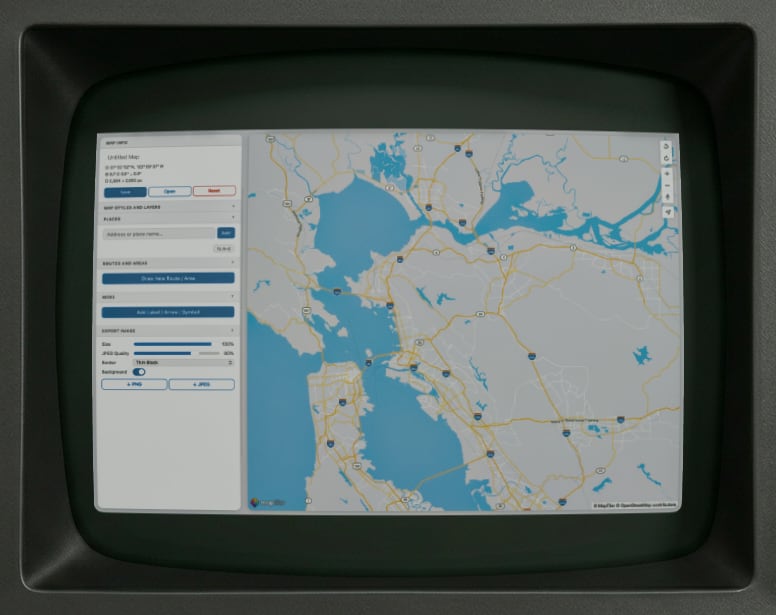
As you travel around the world, you may mistakenly think that other people will want to read about it. You will be anxious to share post after post of text and pictures of your adventures, as if you, yourself, discovered the Trevi Fountain, Machu Picchu or that cat cafe in Tokyo that 5,000 other tourists also visited on the same day.
To make your blog posts at least a tiny bit useful to others, you may want to include a map. Maybe you just want to show where you can walk around in Melbourne and find cafes that serve coffee that is almost exactly the same as what you can get back home.
This map maker tool will let you quickly and easily create maps with places, routes, shaded areas and labels. All without overloading your brain with 753 different functions and tools like other map apps. Then you can export as an image to use as you like. Everyone will be impressed.
To make your blog posts at least a tiny bit useful to others, you may want to include a map. Maybe you just want to show where you can walk around in Melbourne and find cafes that serve coffee that is almost exactly the same as what you can get back home.
This map maker tool will let you quickly and easily create maps with places, routes, shaded areas and labels. All without overloading your brain with 753 different functions and tools like other map apps. Then you can export as an image to use as you like. Everyone will be impressed.
Move the map around to any place in the world to start. Zoom out, move, and then zoom back in again to move quickly. Control+click on the map near a place to add a place, or use the Add function under places in the left sidebar.
Use the Routes tool to draw a route on the map. Use this to give people directions or recommend walks.
Use the More section to add additional labels, arrows and symbols to the map.
Use the Export section to save out as a PNG or JPEG. The map will export exactly as it appears on the page, so resize your browser window to get the image size as you like.
Play around with it. You'll figure it out. If you need further instruction, send a request to your state representative or county clerk.
Use the Routes tool to draw a route on the map. Use this to give people directions or recommend walks.
Use the More section to add additional labels, arrows and symbols to the map.
Use the Export section to save out as a PNG or JPEG. The map will export exactly as it appears on the page, so resize your browser window to get the image size as you like.
Play around with it. You'll figure it out. If you need further instruction, send a request to your state representative or county clerk.
Cartographic output is provided "as-is" with no guarantee of geographic accuracy, topographic fidelity, or alignment with consensus reality. Oliomo accepts no liability for navigation decisions or the amount of fun you have made on the basis of maps produced by this application.
Do not use for official navigation purposes.
Do not use for unofficial navigation purposes.
Purely hypothetical navigation is allowed with a signed and notarized waiver form 726.
Do not use for official navigation purposes.
Do not use for unofficial navigation purposes.
Purely hypothetical navigation is allowed with a signed and notarized waiver form 726.
► LAUNCH APPLICATION
By proceeding, you acknowledge receipt of all applicable notices, whether or not you have read them.